

Published on 16 September 2025
What changes of the URL parameters have been implemented?
With the new update of the map viewer, some URL parameters of the previous one, have been changed and adapted to make it easier and faster to implement the desired changes. Please refer to the table below to learn about the new parameters and adapt your previously edited maps.
The previous way how the parameters of all different layers and maps were structured consisted on many sub-parameters, all linked to the main parameter, leading to a long URL string defining just 1 layer, like this one:
layers=some.layer,some.other.layer&layer_visibility=false,true&layer_opacity=0.7,1.0&layers_timestamp=20240101,The implemented update allows for a shorter and more direct way of including all the information into one single entry, as shown here with the same example as above:
layers=some.layer,f,0.7;some.other.layer@year=2024,t,1.0Not only is it shorter, but easier to manage. Here how it is structured:
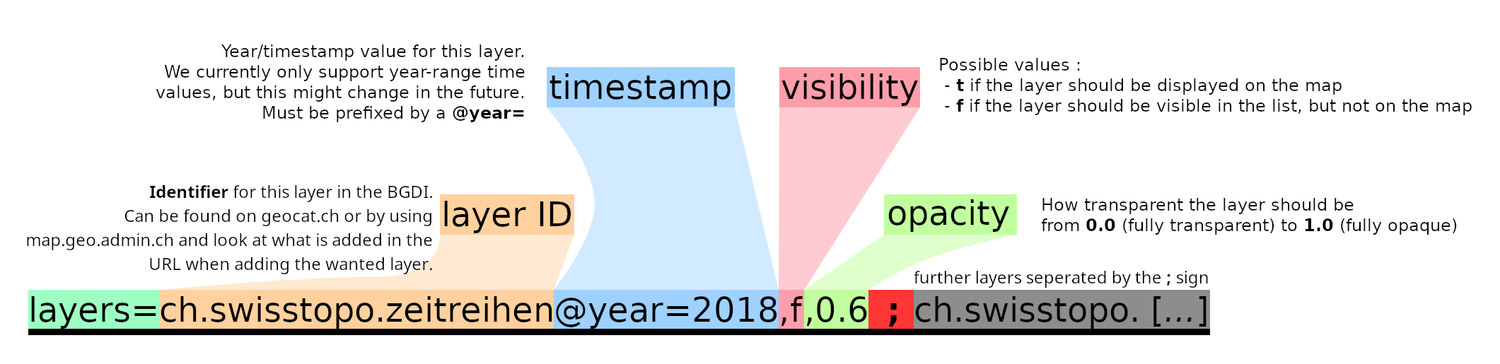
© swisstopo With the new viewer there is no more distinction of HTML file to access if you want to show the normal viewer or the embedded view (it was prior split with index.html and embed.html) To be able to show the embed view there is now a URL parameter embed=true to set.
A previously written URL:
https://map.geo.admin.ch/embed.html?topic=ech&lang=en&bgLayer=ch.swisstopo.pixelkarte-farbe&layers=ch.bfs.gebaeude_wohnungs_registershould now be adapted to:
https://map.geo.admin.ch/?embed=true&topic=ech&lang=en&bgLayer=ch.swisstopo.pixelkarte-farbe&layers=ch.bfs.gebaeude_wohnungs_registerIn order to define where the map is centered, there were 2 different options, each with 2 different parameters:
...&Y=2611512.85&X=1201672.85&...
or
...&E=2611512.85&N=1201672.85&...They have been substituted with the "¢er" expression where the "longitude-equivalent/easting" coordinate being placed first and the "latitude-equivalent/northing" second, like so:
...¢er=2611512.85,1201672.85&...Not only has the "&showTooltip" parameter being replaced, but more options are now possible when choosing where to add the tooltip:
- true / default:
Behaves the same as before when using showTooltip=true
https://map.geo.admin.ch/#/map?lang=en¢er=2611363,1266310&z=9&bgLayer=ch.swisstopo.pixelkarte-farbe&topic=ech&layers=ch.bav.haltestellen-oev@features=8500010&featureInfo=default - bottomPanel:
Places the tooltip at the bottom of the app, this is where the tooltip goes when being shown on a mobile device
https://map.geo.admin.ch/#/map?lang=en¢er=2611363,1266310&z=9&bgLayer=ch.swisstopo.pixelkarte-farbe&topic=ech&layers=ch.bav.haltestellen-oev@features=8500010&featureInfo=bottomPanel - tooltip:
Places the tooltip over the map, as a floating element. This is the default behavior on the desktop.
https://map.geo.admin.ch/#/map?lang=en¢er=2611363,1266310&z=9&bgLayer=ch.swisstopo.pixelkarte-farbe&topic=ech&layers=ch.bav.haltestellen-oev@features=8500010&featureInfo=tooltip - none:
The tooltip does not appear.
https://map.geo.admin.ch/#/map?lang=en¢er=2611363,1266310&z=9&bgLayer=ch.swisstopo.pixelkarte-farbe&topic=ech&layers=ch.bav.haltestellen-oev@features=8500010&featureInfo=none
- true / default:
As an alternative to the BOD layer ID approach, it is now also possible to select layer features by adding @features=featureId1, featureId2, … to the layer entry (in the layers URL parameter)
Instead of adding the layer with all years while selecting the feature you wanted:
https://map.geo.admin.ch/?ch.astra.unfaelle-personenschaeden_fahrraeder=769AE49DEC6D0106E0530A839427D480You can indicate which year the layer will show when displaying your pre-selected feature(s):
https://map.geo.admin.ch/?layers=ch.astra.unfaelle-personenschaeden_fahrraeder@features=769AE49DEC6D0106E0530A839427D480@year=2018